
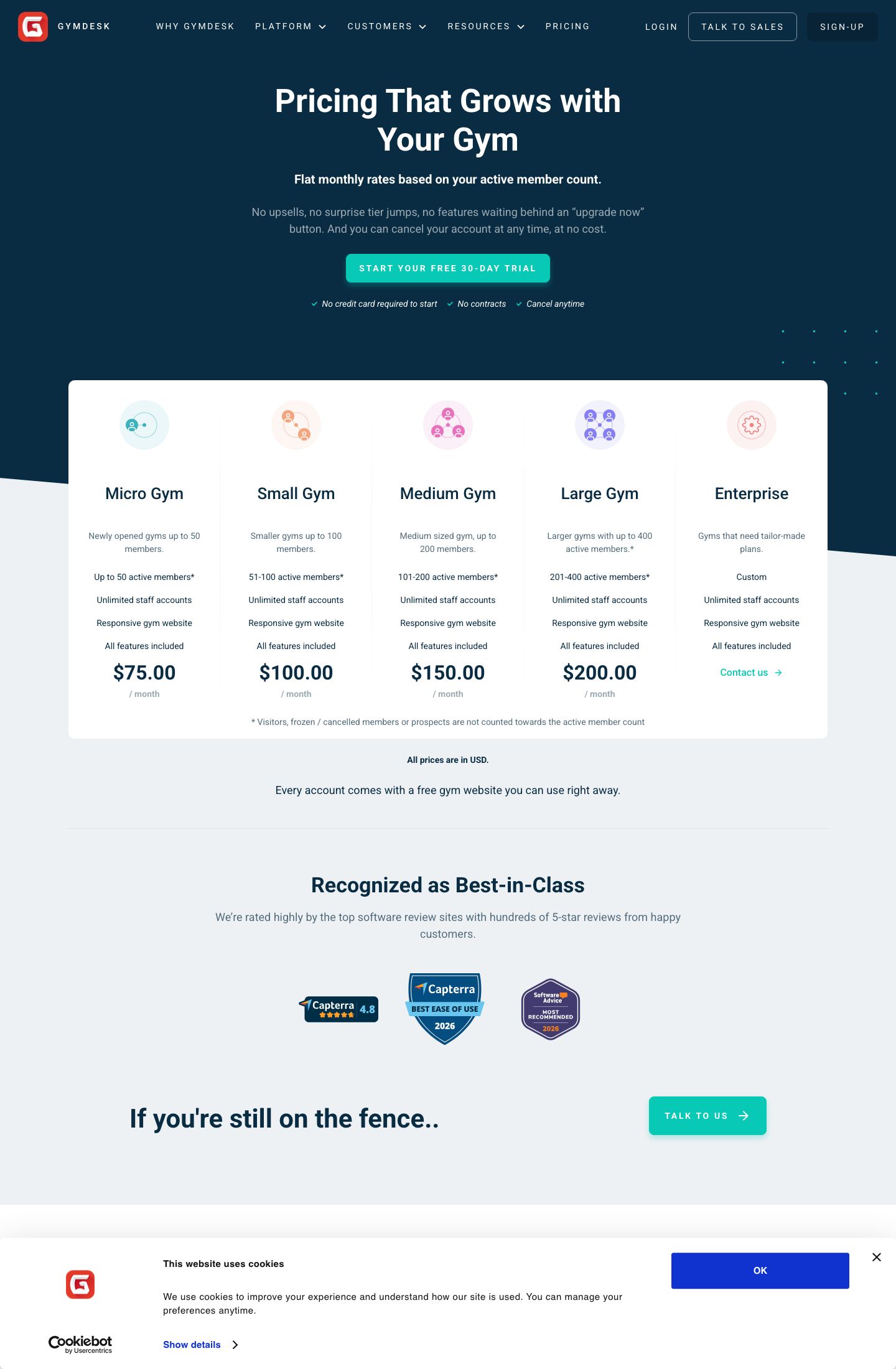
Gymdesk charges a flat monthly rate based on how many active members you have, and it puts every feature on every plan. Pricing runs $75 a month for up to 50 members, $100 up to 100, $150 up to 200 and $200 up to 400. No feature is locked behind a higher tier, and there is no upsell waiting behind an "upgrade now" button. So how much Gymdesk costs is refreshingly easy to answer: count your active members, read the band.
We pulled the live pricing on 11 August 2026. Gymdesk, which began life as Martial Arts on Rails, is gym management software for membership-based facilities, martial arts schools, CrossFit boxes, yoga studios and general gyms. The pitch is simplicity, and unusually for this category, the pricing page delivers on it. What you trade for that simplicity is worth understanding before you sign up.
The Verdict in One Screen
Gymdesk is one of the most transparent, honest-priced tools in the niche, and the all-features-included model removes the usual tier games. It is built for facilities that bill by membership, not for remote 1:1 coaching.
| Quick read | Detail |
|---|---|
| Best for | Membership-based gyms and schools that want flat, all-in pricing |
| Weakest for | Online coaches who need per-client tooling, not member management |
| Pricing | $75 / $100 / $150 / $200 per month by active-member band |
| Feature gating | None. Every feature is included on every tier |
| Free trial | 30 days |
| Contract | Month-to-month, cancel anytime, no contract |
Two dates for the record. This review was first published 11 August 2026 and last checked on 12 August 2026. The bands are monthly rates; whether an annual discount exists was not shown on the page, so budget on the monthly figure.
What Gymdesk Actually Is
Gymdesk is facility software, organized around members rather than clients. Where a coaching tool prices by the people you program for, Gymdesk prices by the people who belong to your gym. That framing runs through the whole product: memberships, billing, a member-facing website, and the admin to keep it all moving.
What the platform includes, per the pricing page:
- Membership management and membership contracts, with contract templates
- A free, responsive gym website with every account
- Member and billing management
- A CRM for prospects
The free website is a genuine extra. Most tools make you build or pay for your web presence separately; Gymdesk hands you a responsive site with the plan. For a small gym without a developer, that alone can save a real setup cost. The pricing page keeps the feature list short and leans on the flat-rate promise instead, so the full module inventory lives on the features page rather than here.
The Pricing: Flat by Member Band, Everything Included
Here is the whole model on one screen. You pay for the band your active-member count lands in, and you get every feature either way.
| Plan | Price | Active members |
|---|---|---|
| Micro Gym | $75.00/mo | Up to 50 |
| Small Gym | $100.00/mo | 51 to 100 |
| Medium Gym | $150.00/mo | 101 to 200 |
| Large Gym | $200.00/mo | 201 to 400 |
| Enterprise | Quote | 400-plus |
The definition of "active member" is where the real money hides, and Gymdesk is fair about it. Frozen members, cancelled clients, prospects in your CRM and visitors do not count toward your band. Only current members do. That matters more than it sounds. A gym with 120 people on the books but 40 frozen over winter pays the up-to-100 band, not the up-to-200 one, so how you manage freezes directly affects your monthly bill.
How do you keep the cost down, then? Keep your roster clean. Because the price is banded, sitting at 101 active members bumps you from $100 to $150 for a single member over the line. If you are hovering near a band edge, it is worth knowing exactly where you stand before a renewal, the same way you would with any threshold pricing.
And how do you know which band you are actually in? Your Gymdesk reports show the active-member count in real time, so you can watch it against the band edges and time any decision. Keeping frozen and cancelled members off the active list will save you a band, and a growing gym can plan an upgrade for the month it will genuinely help. Start the 30-day trial, read your member reports, and you will see exactly where your count sits before you ever pay.
No Feature Gating: What That Actually Buys You
The headline claim, every feature on every tier, is the real differentiator, so it deserves scrutiny. In most of this category, the entry plan is deliberately hobbled: reporting, automations or the branded app wait on a pricier tier. Gymdesk rejects that. A 40-member Micro Gym on the $75 plan gets the same feature set as a 350-member Large Gym on $200. You are paying for scale, not for access.
That model rewards small operators most. A new gym gets the full toolkit on day one, which means you can run memberships, billing, contracts and your website from the cheapest band without discovering a paywall three months in. Compared to a feature-tiered rival where the useful tools live two plans up, Gymdesk's flat model is easier to trust and easier to budget.
The trade-off is that the pricing page tells you little about what those features actually are. It sells simplicity, not specifics, so the features page and the 30-day trial are where the depth of reporting, automations and integrations shows itself.
Where Gymdesk Falls Short
No tool is right for everyone, and Gymdesk's limits are clear.
The category fit is facility-only. Gymdesk manages members, not coaching relationships. An online personal trainer who programs workouts for individual clients will find the model backwards; this is built for a gym with a roster, not a coach with a client list. If you need per-client programming, look elsewhere.
The band edges create small cliffs. Crossing from one band to the next for a single member adds $50 a month until your roster grows into it. It is a minor, predictable quirk of threshold pricing, but it is real, and it rewards keeping your active count honest.
The pricing page is thin on feature detail. Selling flat-rate simplicity is a strength, but it means you cannot judge the depth of the toolset from the pricing page alone. You have to trial it or read the features page, which is more legwork than the transparent price first suggests.
And the annual picture is unclear. The page shows monthly bands with no visible annual discount, so unlike some rivals, there may be no yearly saving to bank on. Budget on the monthly number until you confirm otherwise.
Who Should Actually Buy It
Line it up and the fit is obvious. Gymdesk is a strong choice for a membership-based gym, a martial arts school, a CrossFit box or a studio that wants honest, flat, all-features pricing and a free website thrown in. A small gym in particular gets the full platform from the cheapest band, and the clean member-count model makes the monthly cost easy to predict and easy to control.
It is a weaker choice for an online coach who needs per-client tooling rather than member management, or for anyone counting on an annual discount the page does not advertise. Those buyers should compare Gymdesk's member bands against a per-client or feature-tiered rival at their real numbers.
Our read: rare pricing honesty, every feature included, a free website, held back only by a facility-only model and a pricing page that undersells its own depth. Start the 30-day trial, count your active members, and the features page shows the full toolset behind the flat rate. Rated 8.1/10 on that balance of transparency and facility-first focus.
Sources
- Gymdesk pricing page - the flat member-band prices, the all-features-included promise, and the definition of an active member, captured 11 August 2026.
Estimate your Gymdesk cost
Uses published $75.00/mo by active members starting rate. Updates as you type.
Estimator uses vendor-published list rates as anchor. Actual quotes vary by add-ons (member reporting, class scheduling, payment data feeds, active members tier) — request a written quote before signing.
Book a Gymdesk demo
Vendor-facilitated. We forward your request to their sales team within 24 hours.
- Choose a preferred date + time slot
- 30-minute product walkthrough
- Custom pricing based on your seat count
Screenshots

Pros
- Flat rate by member count, all features included
- Free gym website with every account
Cons
- Enterprise (400+) is quote-based
- Feature list thin on pricing page
Similar Gym Management Software Tools
User Reviews
Write a reviewNo reviews yet for Gymdesk.
Be the first to review