
Pull up the Trainerize pricing page and you hit a small puzzle before you hit a price. The plan cards read $9, $23 and $248 a month. Scroll to the same page's FAQ and the numbers change to $10, $25 and $275. Same plans, same page, two sets of figures. That gap is the first thing any coach should understand about ABC Trainerize, because it tells you the real answer to "what does it cost" is a question, not a number: which billing term, and which part of the page.
So how much does ABC Trainerize cost per month? We audited the live pricing page on 11 August 2026 to answer exactly that, and what follows is built on that page and its published FAQ, not on marketing decks. ABC Trainerize is personal training software for coaches who run their business online, owned by ABC Fitness. It sells one thing well: a way to build workout programs, deliver them through a branded mobile app, and bill clients without chasing a Venmo request. Whether the price works for you depends almost entirely on how many clients you coach. Online training at scale costs real money here, and the per-month figure climbs with your client count.
The Verdict in One Screen
Trainerize is a strong fit for the solo-to-small coach who lives in program design and client accountability. The permanent free tier is real. The paid tiers climb steeply as your client count grows, and the pricing presentation is muddier than it should be.
| Quick read | Detail |
|---|---|
| Best for | Personal trainers and online coaches scaling from 1 to ~50 clients |
| Weakest for | Multi-location facilities that need class scheduling and memberships as the core |
| Entry price | Free (1 client), then paid plans starting near $9-$10/mo (see billing caveat below) |
| Free tier | Permanent, no credit card, 1 coaching client |
| Contract | Month-to-month, cancel anytime; annual optional (vendor says 10% off) |
| Refunds | None for unused portions |
Two dates matter here. This review was first published 11 August 2026 and last checked against the live page on 12 August 2026. Prices move, so treat every figure below as "as observed on those dates."
What Trainerize Actually Is
It is a coaching platform, not a gym-management suite. The distinction matters when you compare it to facility-first tools. Trainerize is organized around the coach-client relationship: you build a program, the client gets it on iOS or Android, you both track progress against their goals, you message between sessions, and you take payment through the app. That loop is what the software is for, and it is where it will help you most.
One caveat on the analytics side. The source facts here cover program delivery, nutrition and macro tracking, and wearable data syncing. Progress tracking is genuinely there, but a deep reporting-and-retention analytics dashboard is not what Trainerize leads with, so do not buy it expecting business-intelligence depth. It is a coaching tool first.
The four things it does out of the box, per the vendor's plan descriptions:
- Workout program building and delivery
- Basic nutrition and macro tracking
- An in-app client mobile app
- In-app messaging between coach and client
Everything above that (a custom-branded app, advanced nutrition, scheduling, referrals) sits behind higher tiers or paid add-ons. Keep that shape in mind. The base is genuinely usable; the growth features cost extra, and they add up.
What You Get, Feature by Feature
Price only means something against what it unlocks, so here is the capability map as the plans describe it. The pattern is simple: coaching depth is broad even on the free plan, while branding, automation and scale are gated upward.
Start with what everyone gets, free tier included. Workout program building and delivery is the core, and it ships on day one. You assemble the exercise sequence, set it live, and the client trains from the app. So does the client mobile app on iOS and Android, basic nutrition tracking, and in-app messaging between you and your client. A trainer can run a real, if bare, coaching relationship without paying a cent, reinforcing the daily habits and check-ins that keep an online client accountable. What you will not find on the free plan is a group or community layer; this is one-to-one coaching software, not a social network.
Move up to Grow and the toolkit fills out. You get custom client programs rather than templates, meal and macro tracking on top of the basic version, a public Trainerize.me profile page, and integrations that pull data from client apps and wearables. This is the tier where the software starts to feel like a business tool instead of a program-delivery pipe.
| Capability | Where it lives | What it does |
|---|---|---|
| Workout program builder + delivery | Free and up | Build and send programs; the product's spine |
| Client mobile app (iOS/Android) | Free and up | Clients train, log and message from the app |
| Nutrition + macro tracking | Basic on Free, fuller on Grow | Meal and macro logging |
| Wearable + app integrations | Grow and up | Syncs client wearable and app data |
| Trainerize.me profile | Grow and up | Public-facing coach profile page |
| Pro custom branded app | Pro (or $169 one-time add-on) | Your logo and branding on the app |
| Referral links + prospect booking | Studio Plus and up | Lead capture and referral flow |
| Studio-level branded app | Studio Plus and up | Fuller white-label than Pro |
| Full customization, e-commerce, account manager | Enterprise | Icon packs, widgets, storefront, dedicated support |
The higher you climb, the more the value shifts from coaching to running a brand. Pro's headline feature is the custom branded app, so your clients download something that looks like yours rather than Trainerize's. Studio Plus layers on the growth machinery: referral links, prospect booking, and a fuller studio-level branded app. Enterprise is where the storefront and account-manager perks live, aimed at operations that need icon packs, widgets and e-commerce baked in.
Then there are the capabilities you buy separately, which is a category of its own. Scheduling, for instance, is not in the base plans at all; it arrives through the Business Add-on at $25 a month, bundled with referrals, payments and on-demand coaching. Video coaching, advanced nutrition and Stripe-powered billing are likewise add-ons rather than tier features (their prices sit in the add-on table further down). If a specific capability is a dealbreaker for you, a like-for-like comparison has to count the add-ons, not just the plan, because Trainerize puts more behind them than most rivals do.
The Pricing Puzzle: Why the Same Page Shows Two Numbers
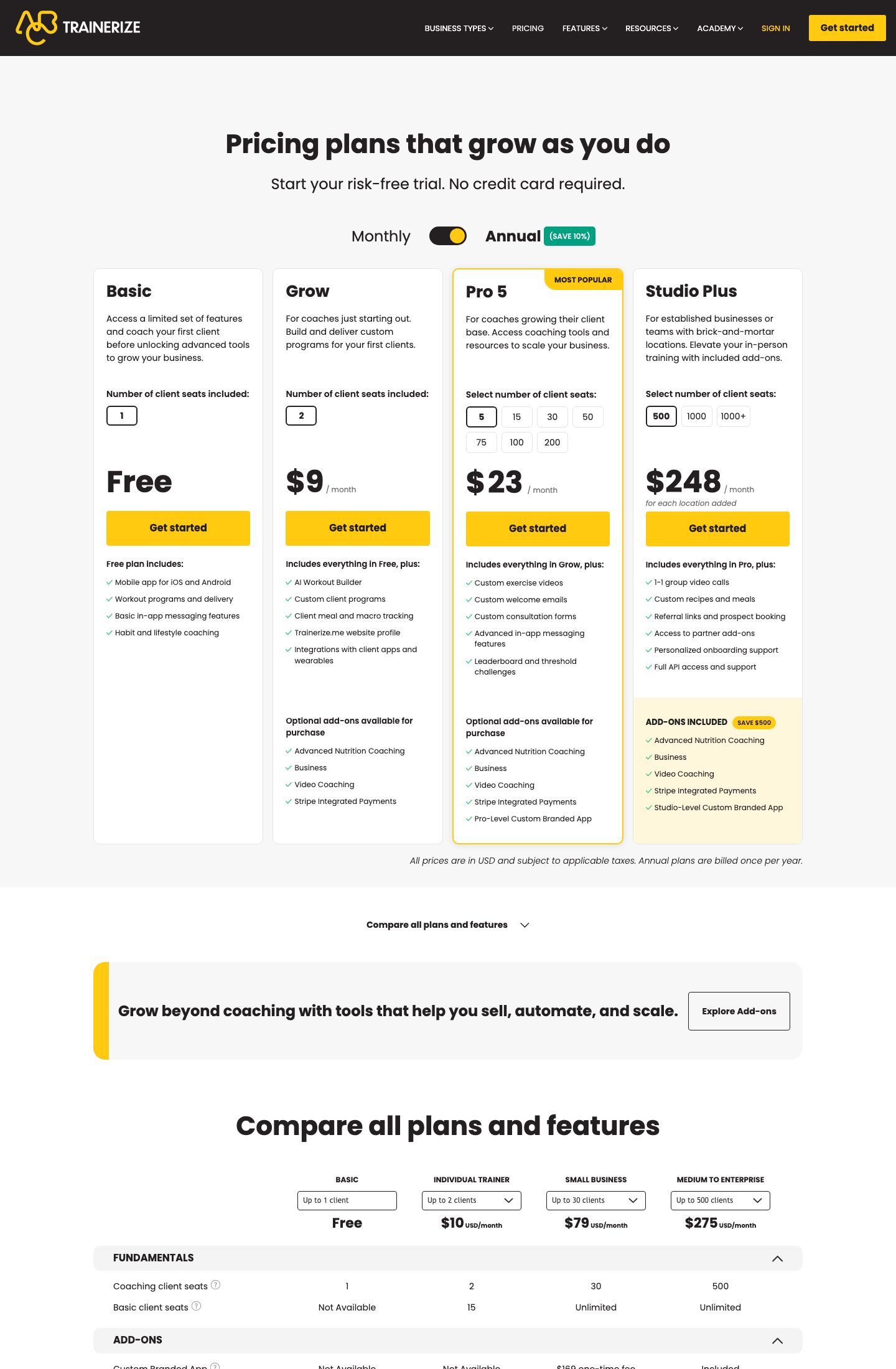
Here is the catch, and it is worth slowing down for. On the plan cards, with the "Monthly" toggle selected, we recorded these figures on 11 August 2026:
| Plan | Card price (Monthly toggle) | Client seats | What it adds |
|---|---|---|---|
| Free | $0, permanent | Up to 1 coaching client | Programs, delivery, mobile app, basic nutrition, messaging |
| Grow | $9 / mo | Up to 2 clients | Custom programs, meal and macro tracking, Trainerize.me profile, wearable integrations |
| Pro 5 | $23 / mo | Selectable seats, from 5 (scales to Pro 200) | Pro-level custom branded app |
| Studio Plus | $248 / mo | Up to 500 members | Referral links, prospect booking, Studio-level branded app |
| Enterprise | Quote only | 500+ | Full customization, dedicated account manager |
Now the same page's FAQ, in its own words: "Trainerize pricing starts at $10/month for the Grow plan," the Pro plan "starts at $25/month for up to 5 clients, scaling to $135/month for up to 50 clients," and Studio Plus "starts at $275/month for up to 500 members." The FAQ also states annual billing saves 10% across paid plans.
So the cards say $9 / $23 / $248 and the prose says $10 / $25 / $275. We could not reconcile the two from the page alone. The most likely explanation, and we are flagging it as a read rather than a confirmed fact, is that the cards default to an annual-billing rate shown as a per-month figure (the ~10% discount lands the annual-equivalent close to those lower numbers), while the FAQ quotes true month-to-month. That would make $9 the discounted annual-per-month and $10 the straight monthly. It fits the 10% claim. It is still a guess.
So how much will you actually pay, and how do you keep from overpaying? The practical rule for a buyer: do not quote yourself a single Trainerize price. Quote a price with a billing term attached. Quote yourself the annual rate or the monthly rate, but never a bare number, because the two differ. A $1-a-month gap sounds trivial. Across a Studio Plus subscription the equivalent gap is $27 a month, or a little over $300 a year, which is no longer trivial. How much that matters depends on your tier, but on the top plan it is real money.
Add-Ons: Where the Real Bill Comes From
So how much do the add-ons really add? The headline tiers are only half the spend. Trainerize sells feature add-ons on top of Grow and Pro plans, and these are where a growing coaching business quietly doubles its monthly cost. From the page's FAQ:
| Add-on | Price | Applies to | Notes |
|---|---|---|---|
| Advanced Nutrition Coaching | $20/mo | Grow, Pro 5, Pro 15 | $45/mo on Pro 30 to Pro 200 |
| Video Coaching | $10/mo | Pro plans | 50 hrs video calling + 100 hrs streaming |
| Business Add-on | $25/mo | Grow, Pro | Scheduling, referrals, payments, on-demand coaching |
| Stripe Integrated Payments | $10/mo | Grow, Pro | Recurring billing through Stripe |
| Pro Custom Branded App | $169 one-time | Pro users | Setup fee, not recurring |
A few things stand out. Video Coaching is capped, not unlimited: 50 hours of calling and 100 of streaming a month on the Pro plans, per the FAQ. The Business Add-on bundles scheduling, referrals and payments, which several competitors fold into their base plan, so a coach who needs booking will pay $25 more here. And the custom branded app splits into a one-time $169 setup on Pro versus being included at no extra cost on Studio and Enterprise. If a branded app is your reason for buying, the math can push you up a tier rather than paying the add-on.
One more line item that is easy to miss: publishing your own app independently to the Apple App Store requires an Apple Developer account at $99 a year, paid to Apple, not to Trainerize. That is Apple's fee, and it applies to anyone who wants a truly standalone store listing.
The Free Tier Is Real. The "Only Two" Claim Is Marketing.
Credit where due. Trainerize's free plan is a permanent tier, not a 14-day trial in disguise. One coaching client, no credit card, and it does not expire. It includes the mobile app, workout programming, basic nutrition tracking and in-app messaging. For a trainer testing the waters with a single online client, that is a genuine on-ramp, and it is rarer than it sounds in this category. Start the free plan, coach one client through a full program, and judge the workflow before you pay a cent.
The vendor goes further and claims Trainerize is "one of only two platforms in this category, alongside Everfit, to offer a permanent free tier." We are separating that from the verified facts on purpose. That is the vendor's own marketing line, not an independent finding. The free tier itself is real and on the page; the market-wide "only two" claim is a sales pitch. Treat the first as a feature and the second as marketing.
There is also a nice structural detail in how the free trial ends. When your trial lapses, the account reverts to the free plan automatically. You do not need to cancel to avoid a charge, which is the opposite of the dark-pattern default some tools use. That is worth a point in Trainerize's favor.
Coaching Clients vs Basic Clients: The Seat Model That Saves Money
The seat count is the whole ballgame on price, so understand what counts as a seat. Trainerize distinguishes two kinds of client. A coaching client gets the full experience: programs, tracking, messaging, the works. A basic client can book appointments and make purchases through the app, but does not get training programs or messaging.
Here is why that matters for your bill: basic clients do not count against your plan's seat limit. They are unlimited on any paid plan. So a studio that sells drop-ins or class packs to a large casual audience, while actively coaching a smaller core, can keep its paid tier small and still transact with everyone else. Read your own client mix against that split before you pick a tier. It can be the difference between Pro 15 and Pro 50.
Where Trainerize Falls Short
No tool is the right tool for everyone, and Trainerize has real edges worth naming before you buy.
The pricing presentation is the first one. A vendor's own page contradicting itself on price, cards versus FAQ, is a poor look and a real source of buyer confusion. We had to reverse-engineer the likely cause, and we still labeled it a guess. You should not have to do arithmetic to learn a subscription's monthly cost.
The tiering gets expensive fast. Between Grow at roughly $9-$10 and Studio Plus at roughly $248-$275, the jump is steep, and the intermediate Pro band scales by seat count in a way the public page does not fully lay out. The FAQ gives anchor points ($25 to start, $135 at 50 clients) but the per-band pricing between Pro 5 and Pro 200 was not fully published where we looked. If you sit at 30 or 40 clients, you will need the live seat selector to know your real number.
The add-on model stacks. A coach who wants advanced nutrition, scheduling and payments is looking at $20 plus $25 plus $10 on top of the base plan. That is $55 a month in add-ons before the plan itself, which changes the value calculation against all-in competitors. Put plainly: a Grow plan loaded with three add-ons can cost more per month than the next tier up, so check the ladder before you stack. Against a rival that bundles scheduling into its base price, Trainerize's line-item model can run higher for the same feature set, though it can also come out lower if you only ever need the core.
And the category fit is narrow by design. Trainerize is coaching-first. If your business is a facility that runs classes, memberships and a front desk, Trainerize's scheduling and membership tooling is an add-on and an afterthought, not the spine of the product. That is not a flaw so much as a boundary, but it is a boundary that catches gym owners who expected a management suite.
Billing Terms, In Plain Terms
The contract structure is refreshingly simple, and it is one of the areas where the page is unambiguous. Plans are month-to-month with no long-term contract. You can cancel anytime. Annual billing is optional and, per the vendor, saves 10%.
One caveat that cuts the other way: there are no refunds for unused portions of a subscription. If you pay annually and leave in month three, you do not get the balance back. So the 10% annual discount is a real saving only if you are confident you will stay the year. For a new coach still validating the online model, month-to-month at the slightly higher rate is the safer bet, and the flexibility is worth the premium.
Who Should Actually Buy It
Line the pieces up and the picture is clear enough. Trainerize earns its keep for the independent trainer or small online coaching business that programs workouts, tracks client progress and wants a branded app without building one. The free tier lets you start at zero. The Pro band carries you through the growth years. The Stripe and payments plumbing means you get paid on time.
It is a weaker choice if your core need is a full facility system, if you resent paying per feature, or if you want one predictable all-in price. For those buyers, a base-plan-heavy competitor may total less than Trainerize at the same client count once the add-ons are counted. How much less depends entirely on which features you switch on.
Our read: strong product, honest free tier, real coaching depth, undercut by a pricing page that makes you work to learn the price. Start the free plan first if the shape fits your business, then register at the vendor's site once you have toggled the billing term and totaled the add-ons. Do not enter a card before you have that number. Rated 7.8/10 on that balance of substance and friction.
Sources
- ABC Trainerize official pricing page - plan cards and on-page FAQ, both captured verbatim on 11 August 2026 (primary source for every figure above).
- Apple Developer Program - the $99/year fee referenced for independent App Store publishing is Apple's, confirmed against Apple's own program page.
Estimate your ABC Trainerize cost
Uses published $9.00/mo (billing term varies) starting rate. Updates as you type.
Estimator uses vendor-published list rates as anchor. Actual quotes vary by add-ons (member reporting, class scheduling, payment data feeds, active members tier) — request a written quote before signing.
Book a ABC Trainerize demo
Vendor-facilitated. We forward your request to their sales team within 24 hours.
- Choose a preferred date + time slot
- 30-minute product walkthrough
- Custom pricing based on your seat count
Screenshots

Pros
- Permanent free tier (1 client, no card)
- Deep coaching + branded-app depth
Cons
- Pricing page contradicts itself (cards vs FAQ)
- Add-on model stacks quickly
Similar Personal Trainer Software Tools
User Reviews
Write a reviewNo reviews yet for ABC Trainerize.
Be the first to review